---
title: Mark and Engrave Metals and More with Cermark by Johnson Plastics
description: How do you mark and engrave metal, such as stainless steel, aluminum, copper, nickel and brass with a CO2 laser? While under normal circumstances you would need a fiber laser to affect those materials, there is a remarkable product to treat metals for engraving with a CO2 laser called Cermark.
image: https://blog.fslaser.com/hubfs/Cermark%202.jpg
---
Search
[**](https://store.fslaser.com/) [**](https://store.fslaser.com/)
** **SHOP
- [Lasers](https://fslaser.com/lasers/)
- [Laser Accessories](https://fslaser.com/laser-accessories/)
- [Laser Replacement Parts](https://fslaser.com/laser-replacement-parts/)
- [Free Laser Samples](https://fslaser.com/samples/)
- [Shop All](https://fslaser.com/shop-all/)
- [News](https://blog.fslaser.com/news)
- [Lasers](https://fslaser.com/lasers/)
- [Software](https://fslaser.com/re3/)
- [Laser 101](https://laser101.fslaser.com/)
- [Support](https://laser101.fslaser.com/support)
- [Company](https://fslaser.com/Company/)
---

Monday, July 9, 2018
# Mark and Engrave Metals and More with Cermark by Johnson Plastics
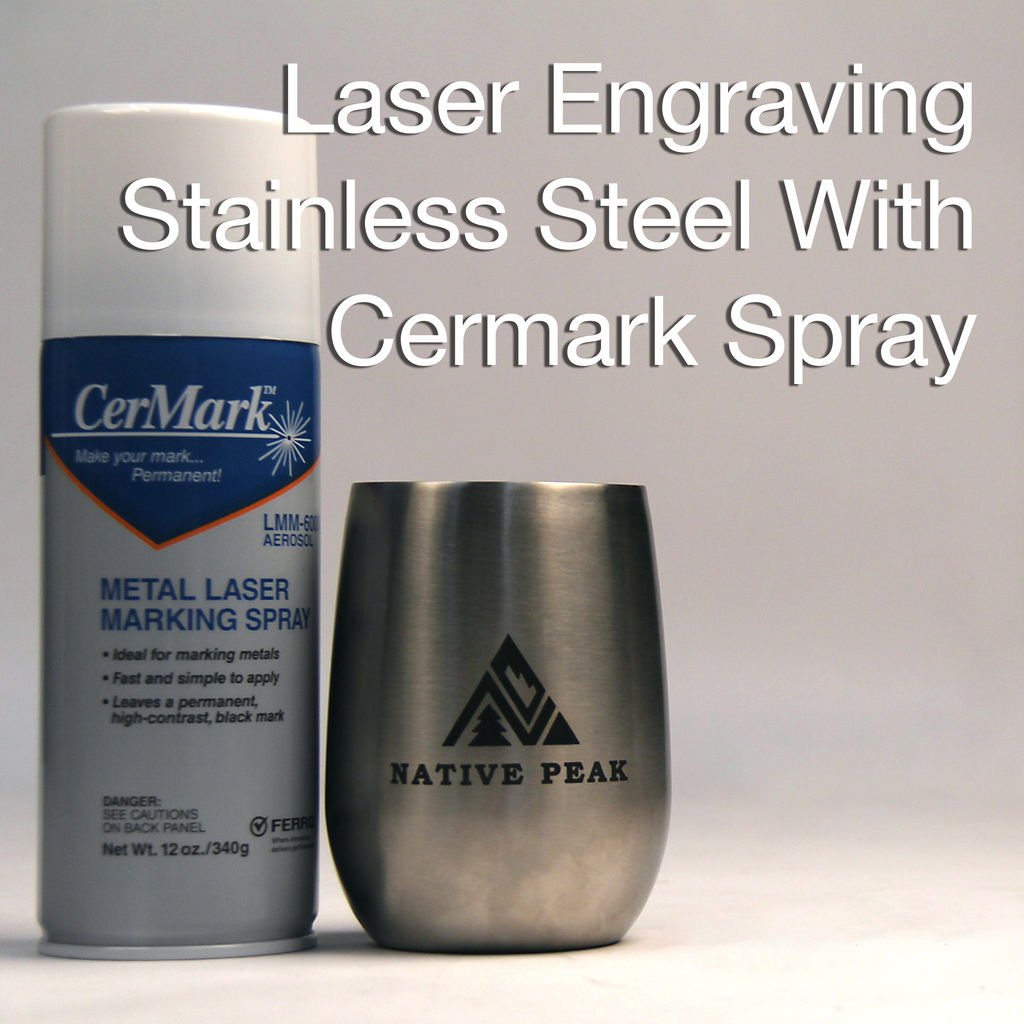
What materials can a [CO2 laser](https://fslaser.com/Products/Lasers) mark and engrave? Wood, paper, glass, acrylic, leather and stone? Check. What about marking and engraving metal, such as stainless steel, aluminum, copper, nickel and brass? While under normal circumstances you would need a fiber laser to affect those materials, there is a remarkable product to treat metals for engraving with a CO2 laser called [Cermark](https://www.johnsonplastics.com/engraving/engraving-supplies/cermark/).
**Eas**y **To Use**
Cermark is an easy way to enable permanent laser marking and engravings to all of these surfaces and more. This is done by glazing the surface of the metal (or other [material](https://laser101.fslaser.com/materialtest)) with a special chemical coating that can be affected by the laser and then cleaned of, leaving a brilliant mark.
[](https://fslaser.com/)
**Easy To Find**
You can purchase Cermark as a paint, tape or spray, which you then apply to the surface of your material. Once dry, you simply engrave your design as normal (or use these [guidelines](http://s3.amazonaws.com/jpmagento-public/documents/techtips/JPP_TechTips_CerMarkMetalMarkingFAQ.pdf)). Once the engraving is complete, you clean off the excess cermark with water and a nylon scrub brush and you are done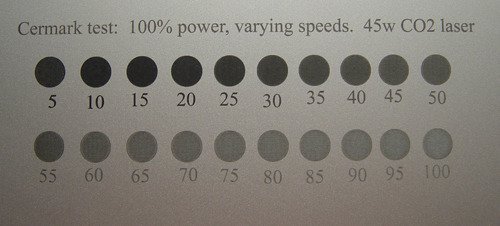](https://fslaser.com/Products/Lasers)Cermark comes exclusively from [Johnson Plastics](https://www.johnsonplastics.com/), who make other specialized materials for laser cutting, such as their line of Rowmark products.
For more exclusive [tips](https://laser101.fslaser.com/tips?hsCtaTracking=e9d242e3-e23c-4a7f-90af-8caf0448912a%7C82f60cf7-4658-4a16-a413-5361d27e56b2), [tutorials](https://laser101.fslaser.com/tutorials-home?hsCtaTracking=10f989a3-c02f-41f0-8df9-21200d21a71a%7C1cae4693-b119-42d4-90a5-4189ce781422), [free project files](https://info.fslaser.com/laser-101-projects-landing?hsCtaTracking=f96f2ef5-ccb3-4241-81a6-3021544b5610%7Ce28bdd08-29e3-4115-b98d-5b509df7d953) and [certifications](https://info.fslaser.com/certification-awaits?hsCtaTracking=3da3a062-73f5-47e0-84ab-dc55aad5c8be%7Cf79252d9-d31b-4f3a-88e3-b6a6459992e5), check out [Laser 101](https://laser101.fslaser.com/) and see what you and your laser cutter are capable of.
###### Sign up for our newsletter
##### DISCOVER
- [Our Lasers](https://fslaser.com/our-lasers/)
- [Software](https://fslaser.com/software/)
- [Laser 101](https://laser101.fslaser.com/)
- [Support](https://fsl3d.zendesk.com/hc/en-us)
- [Blog](https://fslaser.com/blog/)
- [Company](https://fslaser.com/Company/)
- [Contact](https://fslaser.com/contact/)
- [Sign in ](https://blog.fslaser.com/login.php) or [ Register](https://store.fslaser.com/login.php?action=create_account)
- [Sitemap](https://store.fslaser.com/sitemap.php)
##### COMPANY
- [Contact Us](https://fslaser.com/contact/)
- [About Us](https://fslaser.com/Company/)
- [Why Full Spectrum Laser](https://fslaser.com/why-full-spectrum-laser/)
- [Frequently Asked Questions](https://fslaser.com/faq/)
- [Returns and Refunds](https://fslaser.com/refunds/)
- [Terms and Conditions](https://fslaser.com/terms/)
- [Privacy Policy](https://fslaser.com/privacy/)
- [Financing](https://fslaser.com/financing/)
- [Work At Full Spectrum](https://fslaser.com/jobs/)
##### Shop
- [LASERS](https://fslaser.com/lasers/)
- [Laser Accessories](https://fslaser.com/laser-replacement-parts/)
- [Laser Replacement Parts](https://fslaser.com/laser-replacement-parts/)
- [Shop All](https://fslaser.com/shop-all/)
-
###### Connect with Us